# Sources Panel

Source: https://inspectorlab.dev/panels-sources

> For the complete documentation index, see [llms.txt](https://inspectorlab.dev/llms.txt).

# Sources Panel

The Sources panel displays all the page's source code — the HTML document, linked stylesheets, inline and external scripts, and their full content. It combines a hierarchical file navigator on the left with a syntax-highlighted editor on the right, similar to browser DevTools.
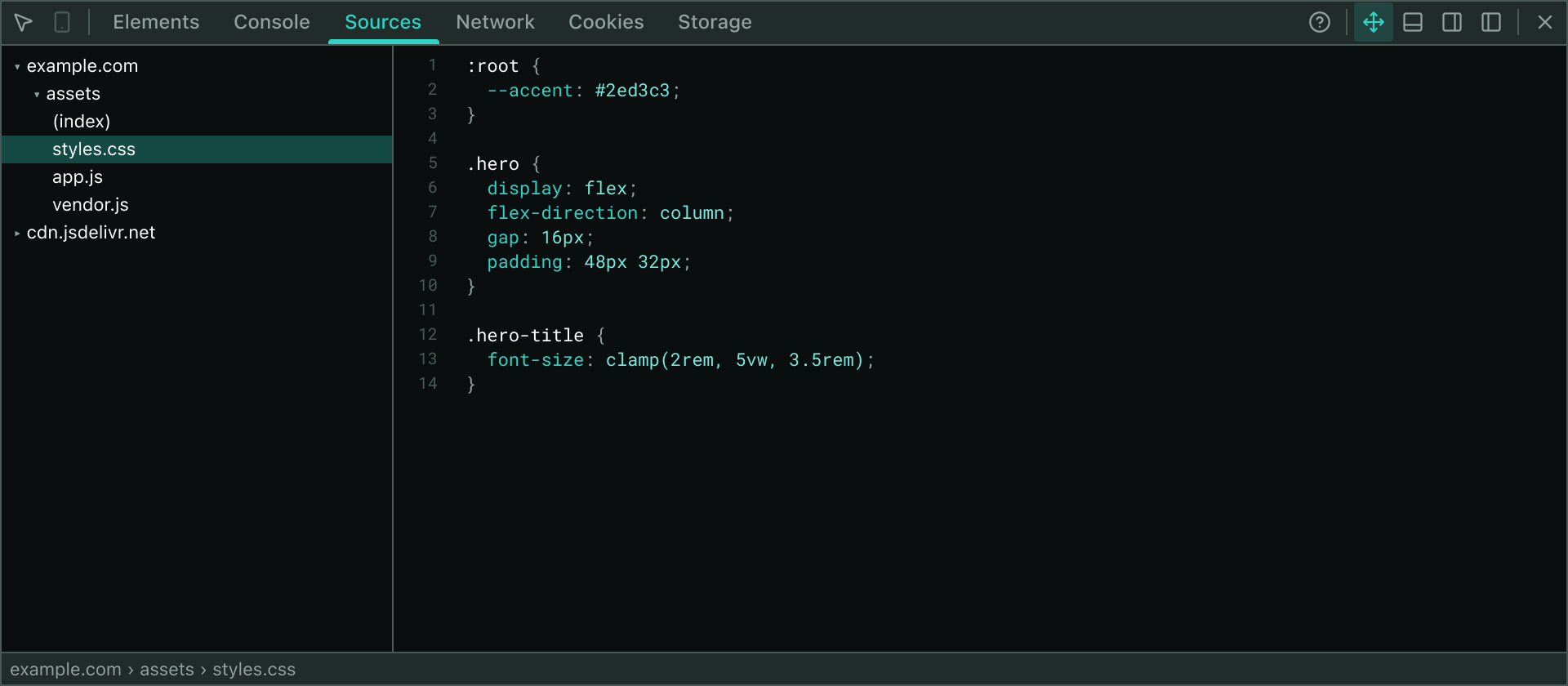
<Frame caption="The Sources Panel: file navigator on the left, syntax-highlighted viewer on the right">
  <img src="/panel-sources.png" alt="The Sources Panel showing the collapsible file tree grouped by host and a syntax-highlighted source file" style={{ borderRadius: "0" }} />
</Frame>

## Overview

The Sources panel provides a read-only view into every piece of source code loaded by the page:

- **Document**: The rendered HTML (cloned and sanitized to exclude Inspector Lab's own UI elements)
- **Stylesheets**: Both inline `<style>` blocks and external resources linked via `<link rel="stylesheet">`
- **Scripts**: Both inline `<script>` bodies and external `.js` files

External resources are fetched on demand only when you open them, keeping the panel responsive. The navigator groups files by host and URL path, making it easy to locate code across multiple origins.

## File Navigator

The left sidebar organizes all sources in a collapsible tree:

- **Hosts** (top-level folders) group files by their origin
- **URL paths** nest deeper, reflecting the server's directory structure
- **Inline sources** (the document, inline styles, and inline scripts) sit at the host root, mirroring how browser DevTools arranges them

Click a folder icon to collapse or expand it. Inline sources are always expanded and show no file icons — only their position on the page matters.

## Source Fetching & Caching

When you click an external file (stylesheet or script) in the navigator:

1. **Page-context fetch first**: Inspector Lab attempts to fetch from the page's context with `cache: "force-cache"` and `credentials: "omit"`. This handles same-origin and CORS-friendly hosts, usually loading from the HTTP cache.
2. **Background fallback**: If that fails (due to CORS or network issues), the extension's background service worker attempts to fetch using the extension's host grants, which bypass some CORS restrictions.
3. **Error handling**: If both attempts fail, the panel displays the error (e.g., "The server responded with 403").

Each external file is fetched once and cached in memory for the lifetime of the panel.

<Callout type="note">
Inline sources (the document, inline styles, and inline scripts) are captured immediately when the panel opens and do not require fetching.
</Callout>

## Content Size Limits

To protect the editor from pathological inline scripts:

- **Maximum file size**: 60,000 characters
- **Maximum lines**: 2,000

If a source exceeds these limits, it is truncated and the status bar shows a "truncated" label.

## Syntax Highlighting

Code is colored according to its type:

- **HTML** (document): Tags, attributes, comments, and text
- **CSS** (stylesheets): Selectors, properties, values, at-rules, and comments
- **JavaScript** (scripts): Keywords, strings, numbers, template literals, and comments

The tokenizer is regex-based and deliberately shallow — it prioritizes accurate coloring for real-world files over perfect parsing. Multi-line constructs (block comments, template literals, unclosed tags) are tracked across lines. Unrecognized syntax falls back to plain text.

## Revealing Sources from the Styles Panel

When you click a stylesheet link in the [Styles panel](/panels-elements), the Sources panel automatically:

1. Selects the stylesheet (or the specific inline style if the link points to one)
2. Re-expands its folder chain so it is visible in the navigator
3. Scrolls the row into view

This linkage makes it easy to jump from a CSS rule back to its source.

## Status Bar

The bottom of the panel displays:

- **Current source URL**: The full URL of the selected file
- **Truncation notice** (if applicable): Shows "truncated" if the source exceeded the size limit

## Interaction & Selection

- **Click a file** to select it and display its content
- **Click a folder** to toggle its expansion state
- **Keyboard navigation**: Use arrow keys and Enter to navigate and select (standard focus behavior)
- **Scroll into view**: The selected row is always scrolled into view after the tree updates

## Limitations

- **Read-only**: The Sources panel does not support editing; it is a viewer only
- **Inline sources only**: Dynamically injected styles or scripts created via `createElement` or `innerHTML` are not captured (only DOM-present sources at panel open time)
- **Size caps**: Very large files are truncated to keep the editor responsive
- **No breakpoints or debugging**: This is a source viewer, not a debugger; the Inspector Lab console and Elements panel provide runtime inspection instead

<Callout type="info">
The Sources panel excludes the Inspector Lab UI itself — the document clone strips out the host container, foreign layers, and state styles automatically.
</Callout>

## Related Panels

- **[Elements Panel](/panels-elements)** — Inspect and edit the DOM tree; contains links to source stylesheets
- **[Console Panel](/panels-console)** — Execute JavaScript in the page context
- **[Network Panel](/panels-network)** — Monitor page requests and responses
